Pick a connection, pick an order type, hit Send order — and watch how your order actually travels to the broker and back. The simulator below shows the difference between a direct FIX API path, a standard MT4/MT5 setup, and an MT4/MT5 broker that runs a dealer plugin on top of the platform.
Quick Answer: The route an order takes between you and the market is shaped by your connection. A direct FIX API connection has fewer intermediate hops and gives the trader more control over how the order is filled. An MT4/MT5 standard setup adds the broker’s platform server in the path. A broker dealer plugin sits between the platform and liquidity, and can requote or reject orders. Use the simulator to see the difference.
Execution report
- Route
- Order
- Status
- Expected price
- Filled price
- Slippage
- Round-trip time ms
Illustrative simulation for educational purposes. Real latency, slippage, and outcomes depend on the broker, the connection, and market conditions.
What the Routes Show
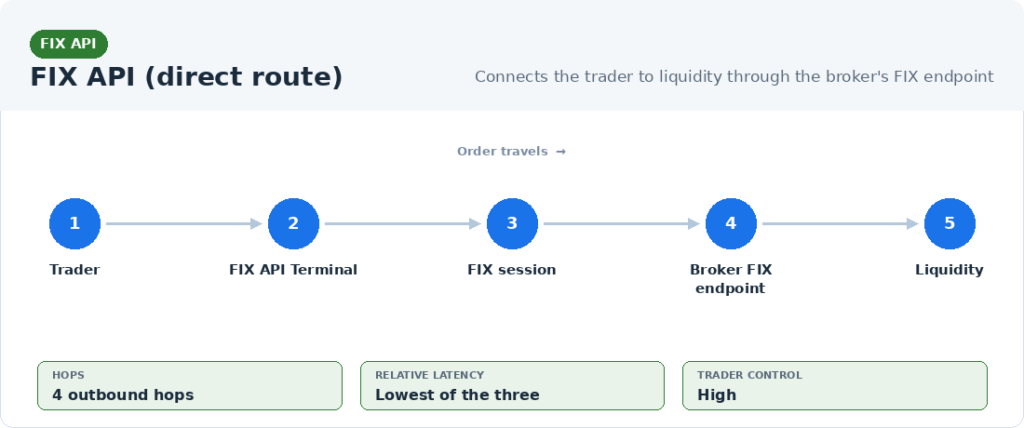
FIX API (direct). The order travels from the trader’s platform to the broker’s FIX endpoint and on to liquidity through the fewest intermediate layers. This is the connection model used widely in professional and institutional trading.
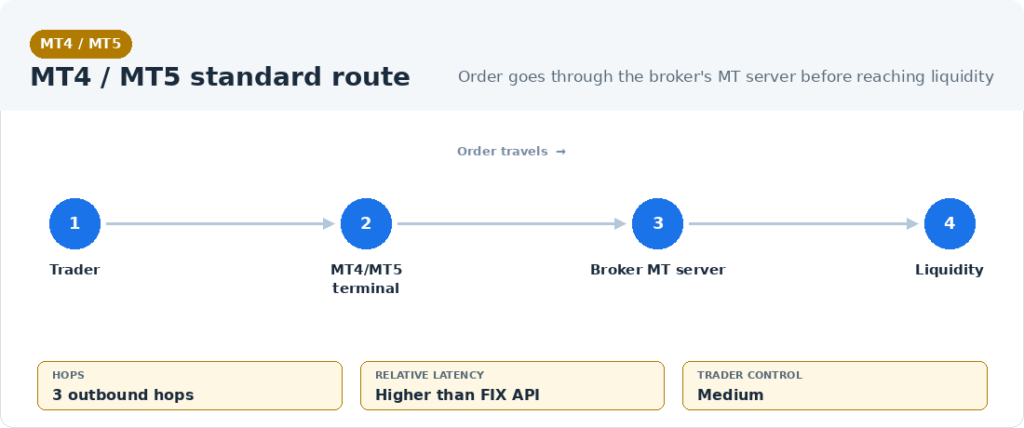
MT4/MT5 standard. A standard MT4 or MT5 setup routes orders through the broker’s platform server. There are more layers than a direct FIX API connection, and more of the execution happens inside the broker’s environment.
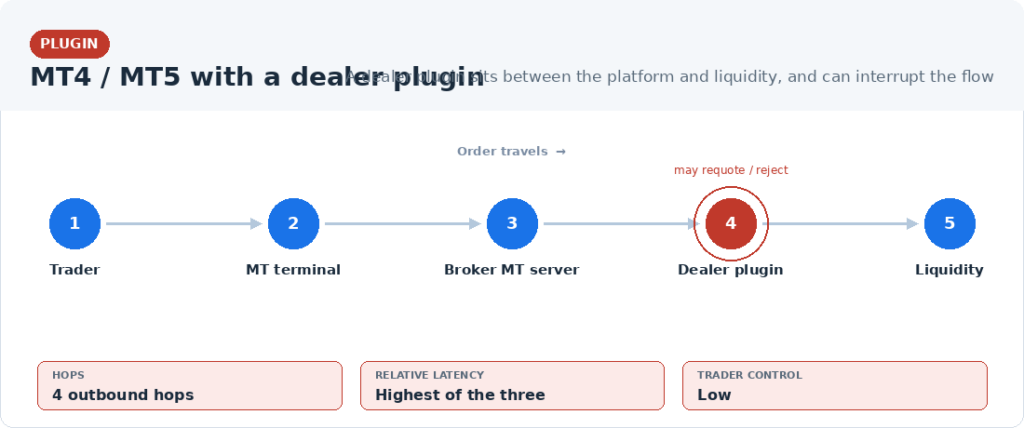
MT4/MT5 + Dealer plugin. Some brokers install a dealer plugin on top of MT4/MT5. The plugin sits between the platform and liquidity. It can add latency, requote prices, or reject orders — behaviors the simulator surfaces deliberately so they are visible rather than hidden.
What Each Order Type Does
Market. Executes at the best available price. Most exposed to slippage, especially on a longer or plugin-mediated path.
Limit. Executes only at the limit price or better. Fills if the market reaches the price; otherwise waits as pending.
Limit IOC (Immediate or Cancel). Fills what it can immediately at the price or better and cancels the remainder. Partial fills are accepted.
Limit FOK (Fill or Kill). Fills in full immediately at the price or better, or is cancelled entirely. The simulator reflects that an FOK is more likely to be cancelled on a dealing-desk route — that is exactly what FOK is designed to do: refuse rather than fill on worse terms.
Frequently Asked Questions
What does this simulator show?
It shows the lifecycle of a trading order under three different connection models — FIX API direct, MT4/MT5 standard, and MT4/MT5 with a dealer plugin — for four order types. The visual highlights the number of intermediate layers and the typical effects of each on latency and execution.
Are the timings and slippage real?
The numbers are illustrative, not measurements. They are tuned to reflect the typical relative differences between connection models. Real latency and slippage always depend on the broker, the infrastructure, and market conditions.
What is a dealer plugin on MT4/MT5?
A dealer plugin is software that some brokers install on top of MT4 or MT5 to manage order flow. It can add latency, requote prices, or reject orders before they reach liquidity. The simulator surfaces these behaviors as part of the educational point.
Why does the FIX API route have fewer hops?
A direct FIX API connection links the trader’s platform to the broker’s FIX endpoint without routing through a standard retail platform server. Fewer intermediate layers means fewer places to add latency or alter the order.
Why does Limit FOK sometimes get cancelled?
Fill or Kill must execute in full at the price or better, or be cancelled entirely. If full liquidity at the price is not available — for example because a dealer plugin intervenes — FOK refuses to partially fill or fill at a worse price. That is the trade-off FOK is designed to make.
Can I use FIX API trading on my MT4 or MT5 account?
No. FIX API trading requires an account with a broker that provides FIX API connectivity. FIX API Terminal connects to such brokers directly, and can also run MQL-based robots through a FIX API connection when the robot source code is available.
Download the free FIX API trading platform Learn how FIX API trading works